Parallel Construct
In this exercise, we will create a parallel region and execute the computational content in parallel. First, however, this exercise is to create a parallel region and understand the threads’ behaviour in parallel. In later exercises, we will study how to parallelise the computational task within the parallel region.
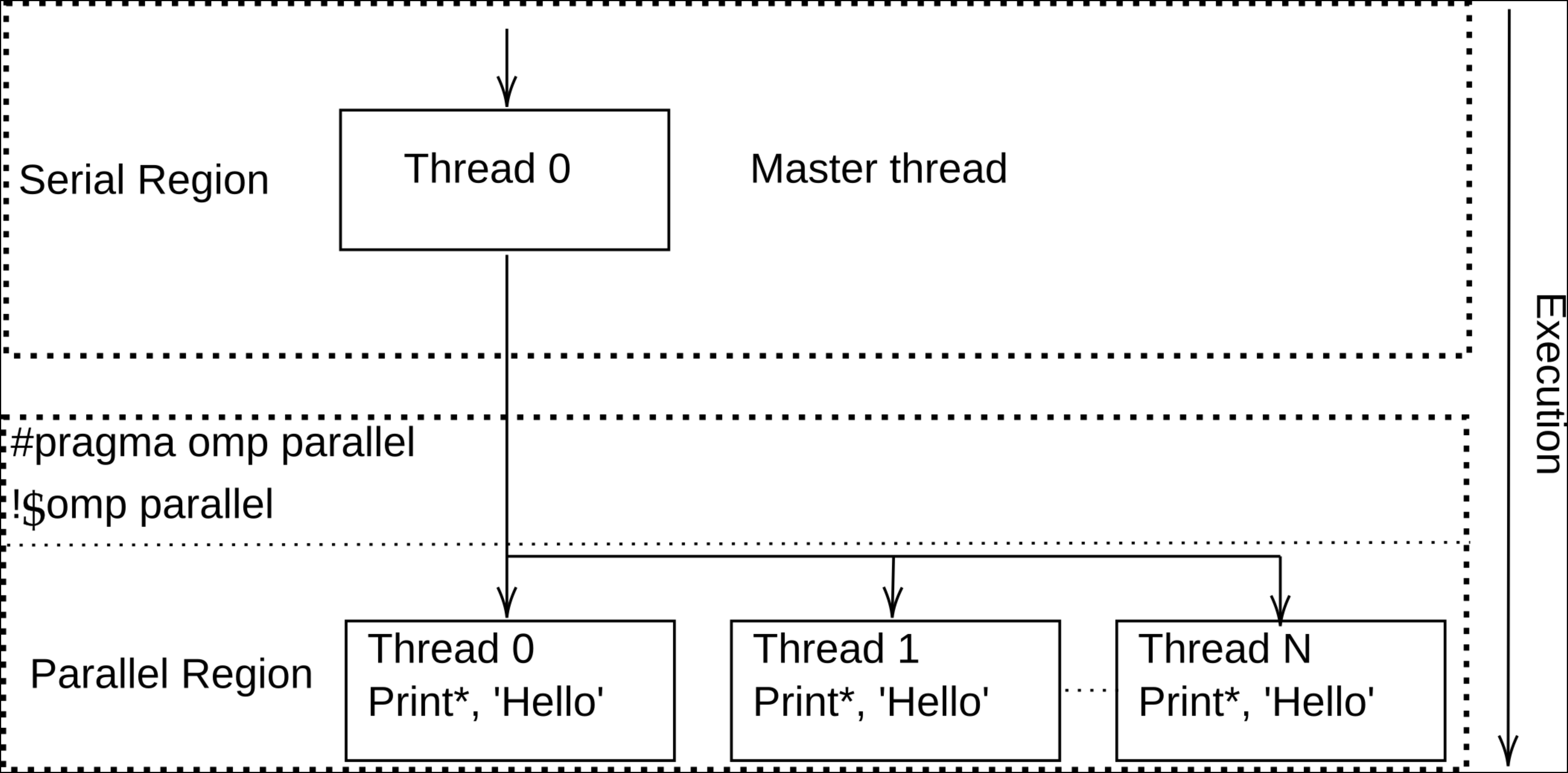
To create a parallel region, we use the following parallel constructs:
Parallel Constructs
#pragma omp parallel
!$omp parallel
The above figure illustrates the parallel region behaviour; as we notice, within the parallel region, we get parallel threads. This means parallel threads can be executed independently of each other, and there is no order of execution.
At the same time, in order to enable OpenMP constructs, clauses, and environment variables, we need to include the OpenMP library as follows:
OpenMP library
#include<omp.h>
use omp_lib
Compilers
The following compilers would support the OpenMP programming model.
GNU — Open source, supports Intel and AMD CPUs
Intel — Optimized for Intel CPUs
AOCC — Suitable for AMD CPUs, especially “Zen” core architecture
Examples (GNU, Intel and AMD): Compilation
$ gcc test.c -fopenmp
$ g++ test.cc -fopenmp
$ gfortran test.f90 -fopenmp
$ icc test.c -qopenmp
$ icpc test.cc -qopenmp
$ ifort test.f90 -qopenmp
$ clang test.c -fopenmp
$ clang++ test.cc -fopenmp
$ flang test.f90 -fopenmp
Questions and Solutions
Examples: Hello World
#include<iostream>
using namespace std;

int main()
{
  cout << endl;
  cout << "Hello world from the master thread"<< endl;
  cout << endl;

  return 0;
}
program Hello_world_Serial

print *, 'Hello world from master thread'

end program
#include<iostream>
#include<omp.h>
using namespace std;
int main()
{
  cout << "Hello world from the master thread "<< endl;
  cout << endl;

  // creating the parallel region (with N number of threads)
  #pragma omp parallel
   {
        cout << "Hello world from the parallel region "<< endl;
    } // parallel region is closed

cout << endl;
cout << "end of the programme from the master thread" << endl;
return 0;
}
program Hello_world_OpenMP
use omp_lib

print *, 'Hello world from master thread'

!$omp parallel
print *, 'Hello world from parallel region'
!$omp end parallel

print *,'end of the programme from master thread'

end program
Compilation and Output
// compilation
$ g++ Hello-world-Serial.cc -o Hello-World-Serial

// execution
$ ./Hello-World-Serial

// output
Hello world from the master thread
// compilation
$ gfortran Hello-world-Serial.f90 -o Hello-World-Serial

// execution
$ ./Hello-World-Serial

// output
Hello world from the master thread
// compilation
$ g++ -fopenmp Hello-world-OpenMP.cc -o Hello-World-OpenMP

// execution
$ ./Hello-World-OpenMP

// output
Hello world from the parallel region
Hello world from the parallel region
..
..
Hello world from the parallel region

end of the programme from the master thread
// compilation
$ gfortran -fopenmp Hello-world-OpenMP.f90 -o Hello-World-OpenMP

// execution
$ ./Hello-World-OpenMP

// output
Hello world from the master thread
Hello world from the parallel region
..
..
Hello world from the parallel region
End of the programme from the master thread
Questions
What do you notice from those examples? Can you control parallel region printout, that is, how many times it should be printed or executed?
What happens if you do not use the OpenMP library,
#include<omp.h>oruse omp_lib?
Although creating a parallel region would allow us to do the parallel computation, however, at the same time, we should have control over the threads being created in the parallel region, for example, how many threads are needed for a particular computation, thread number, etc. For this, we need to know a few of the important environmental routines provided by OpenMP.
Environment Routines (important)
Define the number of threads to be used within the parallel region
(C/C++):   void omp_set_num_threads(int num_threads);
(FORTRAN): subroutine omp_set_num_threads(num_threads)
           integer num_threads
To get the number of threads in the current parallel region
(C/C++):   int omp_get_num_threads(void);
(FORTRAN): integer function omp_get_num_threads()
To get available maximum threads (system default)
(C/C++):   int omp_get_max_threads(void);
(FORTRAN): integer function omp_get_max_threads()
To get thread numbers (e.g., 1, 4, etc.)
(C/C++):   int omp_get_thread_num(void);
(FORTRAN): integer function omp_get_thread_num()
To know the number of processors available to the device
(C/C++):   int omp_get_num_procs(void);
(FORTRAN): integer function omp_get_num_procs()
Questions and Solutions
Questions
How can you identify the thread numbers within the parallel region?
What happens if you do not set
omp_set_num_threads(), for example,omp_set_num_threads(5)/call omp_set_num_threads(5), what do you notice? Alternatively, you can also set the number of threads to be used in the application during the compilationexport OMP_NUM_THREADS; what do you see?
Examples: Thread identification
#include<iostream>
#include<omp.h>
using namespace std;
int main()
{
  cout << "Hello world from the master thread "<< endl;
  cout << endl;

  // creating the parallel region (with N number of threads)
  #pragma omp parallel
   {
        //cout << "Hello world from thread id "
        << " from the team size of "
        << endl;
    } // parallel region is closed

cout << endl;
cout << "end of the programme from the master thread" << endl;
return 0;
}
program Hello_world_OpenMP
use omp_lib

!$omp parallel
!! print *,
!$omp end parallel

end program
#include<iostream>
#include<omp.h>
using namespace std;
int main()
{
  cout << "Hello world from the master thread "<< endl;
  cout << endl;

  #pragma omp parallel
   {
        cout << "Hello world from thread id "
        << omp_get_thread_num() << " from the team size of "
        << omp_get_num_threads()
        << endl;
    }

cout << endl;
cout << "end of the programme from the master thread" << endl;
return 0;
}
program Hello_world_OpenMP
use omp_lib

!$omp parallel
print *, 'Hello world from thread id ', omp_get_thread_num(), 'from the team size of', omp_get_num_threads()
!$omp end parallel

end program
$ export OMP_NUM_THREADS=10
# or
$ setenv OMP_NUM_THREADS 4
# or
$ OMP_NUM_THREADS=4 ./omp_code.exe
Hello world from thread id 3 from the team size of 10
Hello world from thread id 0 from the team size of 10
Hello world from thread id 7 from the team size of 10
Hello world from thread id 4 from the team size of 10
Hello world from thread id 8 from the team size of 10
Hello world from thread id 1 from the team size of 10
Hello world from thread id 6 from the team size of 10
Hello world from thread id            0 from the team size of          10
Hello world from thread id            4 from the team size of          10
Hello world from thread id            5 from the team size of          10
Hello world from thread id            9 from the team size of          10
Hello world from thread id            2 from the team size of          10
Hello world from thread id            3 from the team size of          10
Hello world from thread id            7 from the team size of          10
Hello world from thread id            6 from the team size of          10
Hello world from thread id            8 from the team size of          10
Hello world from thread id            1 from the team size of          10
Utilities
The main aim is to do the parallel computation to speed up computation on a given parallel architecture. Therefore, measuring the timing and comparing the solution between serial and parallel code is very important. In order to measure the timing, OpenMP provides an environmental variable, omp_get_wtime().
Time measuring
double start;
double end;
start = omp_get_wtime();
... work to be timed ...
end = omp_get_wtime();
printf("Work took %f seconds\n", end - start);
DOUBLE PRECISION START, END
START = omp_get_wtime()
... work to be timed ...
END = omp_get_wtime()
PRINT *, "Work took", END - START, "seconds"